
AI Video Animation: How to Bring Static Images to Life
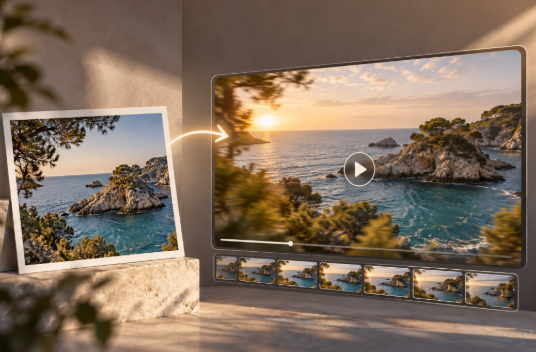
Static images are powerful, but they have one obvious limitation: they do not move.
That is exactly where AI Video Animation is changing the way brands, creators and businesses produce visual content. Instead of starting from a full video production, it is now possible to take an existing image and transform it into a short animated sequence with movement, depth, camera motion and visual continuity.
A product photo can become a cinematic shot. A portrait can gain subtle facial movement. A landscape can feel alive through moving clouds, vegetation or light. Even a simple branded image can be transformed into dynamic content for social media, advertising or digital campaigns.
This evolution is part of a broader shift in generative AI, where image-to-video models are becoming increasingly capable of preserving the structure and visual identity of a reference image while generating motion around it. Research into video diffusion models has already demonstrated that static visual inputs can be used as a basis for generating temporally coherent video sequences.
But generating movement is only part of the challenge. The real goal is to make that movement feel intentional, consistent and visually convincing.
What is AI Video Animation?
AI Video Animation refers to the use of artificial intelligence to transform a static image into moving visual content.
Instead of manually animating individual elements frame by frame, an AI model analyses the image and predicts how objects, people, backgrounds or the virtual camera could move over time.
The process can create effects such as:
Camera zooms and pans.
Subtle movement in people or objects.
Animated backgrounds.
Changes in lighting.
Motion in hair, clothes, water or vegetation.
Depth and parallax effects.
Cinematic transitions.
Character gestures or facial expressions.
The result is usually a short video clip generated from a single image or from a combination of an image and a text prompt.
The text prompt becomes especially important because it can help describe what should move and how.
For example, instead of simply uploading an image of a car, the user might ask the AI to create a slow cinematic camera movement while the reflections on the vehicle change naturally.
This combination of image reference and written direction is what gives creators much greater control over the final result.
How does AI turn a static image into video?
At a basic level, image-to-video AI must solve a difficult problem: it needs to imagine what happens before, after and between the pixels contained in a single still image.
A photograph only represents one moment.
The AI must predict how the scene could evolve while trying to preserve the visual information that makes the original image recognizable.
Modern image-to-video systems commonly build on generative video architectures such as diffusion models. These systems gradually generate frames while taking the original image as a visual condition.
Research into models such as Stable Video Diffusion has shown how an image can be introduced as a conditioning input so that the generated sequence maintains a relationship with the original visual while introducing temporal motion.
In practical terms, the process usually looks much simpler to the user:
Upload an image.
Describe the desired movement.
Define the type of shot or animation.
Generate the video.
Review and refine the result.
Behind those few steps, however, the model is continuously trying to maintain consistency across all the generated frames.
Why is consistency so important in AI Video Animation?
A video can contain attractive individual frames and still feel wrong when played.
This happens because video requires temporal consistency.
If a person's face changes slightly from one frame to another, a product suddenly changes shape or an architectural detail appears and disappears, the viewer immediately notices that something feels artificial.
This is one of the main differences between generating an image and generating a video.
In a static image, the model only needs to create one coherent composition.
In video, every frame must also make sense in relation to the previous and following frames.
That means successful AI Video Animation depends not only on creating movement but on preserving:
Identity.
Shape.
Proportions.
Materials.
Colours.
Lighting.
Background elements.
Spatial relationships.
The better these elements remain stable, the more professional the resulting animation feels.
What types of static images can be animated?
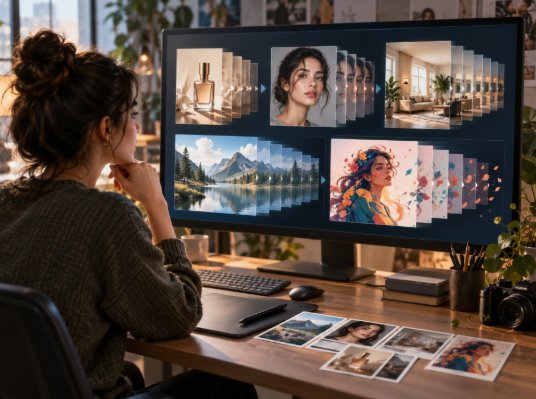
One of the most interesting aspects of AI video generation is the variety of source material that can be used.
Product photography
A static product shot can become a short promotional sequence.
The camera can move around the object, lighting can shift or subtle environmental motion can be introduced.
This can be particularly useful for ecommerce, product launches and social media content where a single photograph may otherwise have limited visual impact.
Portraits
AI can introduce subtle movements such as blinking, breathing, head motion or changes in expression.
The goal does not always have to be dramatic animation.
In many cases, very small movements are enough to make a portrait feel significantly more dynamic.
Architecture and interiors
Architectural renders and photographs can benefit from slow camera movements, changing light, moving curtains or environmental details.
This can help transform a static visualization into something closer to a cinematic presentation.
Landscapes
Landscapes are particularly suitable for animation because many natural elements already suggest movement.
Clouds, waves, trees, fog, light and reflections can all be animated to create atmosphere.
Illustrations
Illustrations, concept art and digital artwork can also be animated.
Instead of trying to make the entire scene move, the AI can focus on selected areas to preserve the original artistic style.
AI Video Animation vs traditional animation
Traditional animation gives creators a very high level of control, but it can require considerable time and technical skill.
Depending on the project, animators may need to create keyframes, masks, motion paths, layers and transitions manually.
AI does not necessarily replace those techniques.
Instead, it introduces a faster way to generate movement from material that already exists.
For simple promotional clips or social content, this can dramatically reduce production time.
For more complex projects, AI-generated movement can also become a starting point that is later refined through traditional editing or motion design.
The important difference is that AI Video Animation lowers the barrier between having a static visual and producing a moving version of it.
Why brands are turning static images into video
Brands already produce large amounts of visual material.
Product photography, campaign images, catalogue images, social media posts, renders and illustrations may already exist before a video campaign begins.
Traditionally, turning all those assets into video would require additional production.
AI changes that relationship.
Existing visual assets can potentially be reused and animated instead of recreated from scratch.
This can be particularly valuable when brands need to produce:
Social media videos.
Paid advertising creatives.
Product teasers.
Website hero content.
Digital displays.
Campaign variations.
Short-form promotional videos.
A single image can therefore become the starting point for several different pieces of moving content.
From image to video for social media
Social platforms increasingly prioritise moving content.
That creates a challenge for brands whose existing asset libraries contain more photography than video.
AI image-to-video tools provide a way to bridge that gap.
For example, a fashion campaign photo can gain subtle fabric movement and camera motion.
A food image can incorporate steam, changing light or a slow push-in.
A travel image can animate water, vegetation or clouds.
These animations do not need to become long videos.
A few seconds of well-controlled motion can be enough to turn a static post into a more engaging visual.
This is particularly useful for vertical short-form formats where attention is often won or lost within the first seconds.
Product marketing and AI Video Animation
Product marketing is one of the areas where this technology can be especially effective.
A brand may already have professionally photographed products.
Instead of organising a new video shoot for every variation, AI can help create additional motion-based assets from selected images.
Imagine a skincare bottle photographed against a clean background.
AI could introduce:
Slow camera movement.
Soft light changes.
Reflections moving across the packaging.
Water or particles in the environment.
A gradual reveal of the product.
The original product photograph remains the visual anchor, while the animation adds a sense of production value.
However, product accuracy is especially important.
If the AI changes the label, logo, proportions or packaging design, the result may no longer be usable commercially.
That is why careful source selection and controlled prompts matter.
Using AI animation for ecommerce
Ecommerce pages are another area where static-to-video content can add value.
Product listings frequently rely on multiple photographs to communicate shape, material and detail.
A short animated view can provide additional visual information without requiring a full product video shoot.
This does not mean replacing product photography.
Instead, animation can complement it.
For example, the main product image might remain static while a secondary gallery asset shows a slow movement around the product.
This creates a richer presentation while reusing the same visual source material.
Bringing concept art and creative ideas to life
AI Video Animation is not only useful for finished commercial assets.
It can also support the creative process.
Concept artists, designers and creative teams can animate early ideas to understand how a scene might feel in motion.
An illustration of a futuristic city can be transformed into a short atmospheric sequence.
A storyboard frame can become a rough cinematic shot.
A key visual for a campaign can be tested with different camera movements before committing to production.
In this context, AI acts as a visual prototyping tool.
The generated clip does not necessarily need to become the final asset.
Its value may lie in helping a team communicate an idea more clearly.
How prompts influence the final animation
The original image provides the visual foundation, but the prompt helps define the movement.
Generic prompts often produce generic results.
If the instruction is simply:
“Animate this image.”
the model has to make many decisions independently.
A more specific instruction can describe:
Camera movement.
Speed.
Direction.
Subject movement.
Environmental motion.
Lighting.
Mood.
Cinematic style.
For example:
“A slow camera push toward the product while soft reflections move across the glass surface and the background remains stable.”
This tells the model much more clearly what should happen.
Good prompting therefore becomes less about describing what is already visible and more about describing what should change over time.
Camera movement can completely change the result
One of the easiest ways to make a static image feel cinematic is to animate the virtual camera.
Common movements include:
Push-in: the camera slowly moves toward the subject.
Pull-out: the view gradually reveals more of the environment.
Pan: the camera moves horizontally across the scene.
Tilt: the camera moves vertically.
Orbit: the camera appears to move around an object.
Different movements create different emotional effects.
A slow push-in can create focus and intimacy.
A wide pull-back can reveal scale.
An orbit can help present a product more dynamically.
Choosing the right movement is therefore just as important as deciding what objects should animate.
Subtle motion often looks more realistic
One of the most common mistakes when generating AI animation is asking for too much movement.
When every part of the image changes at the same time, inconsistencies become more likely.
Subtle animation often produces stronger results.
Instead of making a person walk, turn and interact with several objects, it may be better to introduce small head movement, breathing and moving hair.
Instead of transforming an entire landscape, animate the water and clouds while keeping the architecture stable.
This approach helps preserve the source image and reduces the opportunity for visual errors.
For professional content, less movement can often look more convincing.
How to prepare an image for better AI animation
The quality of the source image strongly influences the animation.
A clean image with a clear subject generally gives the AI less ambiguity.
It helps when:
The main subject is clearly visible.
The composition is not excessively crowded.
Important objects are not heavily cropped.
Lighting is consistent.
The image has enough resolution.
Small details are visually clear.
If the image contains too many overlapping elements, the model may struggle to understand what should remain stable.
Choosing the right image is therefore already part of the animation process.
Can AI Video Animation preserve a brand's visual identity?
It can, but consistency needs to be actively managed.
Brands often rely on very specific colours, products, styling and visual rules.
If the generated animation changes those details, the content can quickly feel disconnected from the original campaign.
The best approach is to treat the original image as a strict visual reference and keep the requested motion focused.
This is particularly important for:
Packaging.
Fashion collections.
Branded environments.
Character design.
Corporate visual systems.
AI should enhance the existing visual identity rather than redesign it unintentionally.
AI animation as part of a wider content workflow
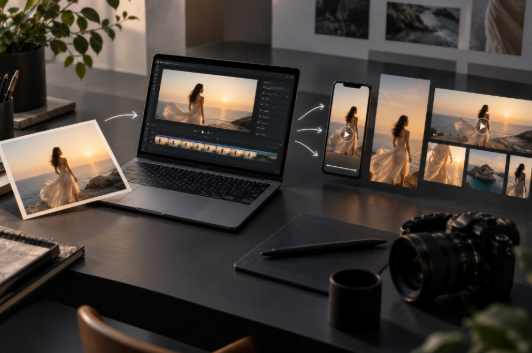
The most effective use of AI video is rarely isolated.
A single workflow might begin with an image, transform it into motion and then adapt that video into different formats.
For example:
Static campaign image → AI animation → vertical social clip → advertising variation → website animation.
This approach helps brands extract more value from existing creative assets.
It also connects naturally with other forms of generative video production.
If you are exploring broader video generation workflows, Oopsify's content on Text to Video AI can help explain how video can also be created directly from written prompts rather than starting from an existing visual.
Likewise, AI Video Avatars represent another way of generating video content through synthetic characters and presenters.
Together, these workflows demonstrate that AI video creation is no longer based on one single method.
Where AI Video Animation is heading
The technology is moving toward greater control and consistency.
Research continues to focus on maintaining visual identity across frames, generating longer sequences and giving users more control over camera motion and subject movement.
The development of open image-to-video systems has already demonstrated the possibility of preserving much of the content, structure and visual style of a reference image while generating motion around it.
As these capabilities improve, the distinction between static asset creation and video production will become increasingly fluid.
A photograph may no longer represent the final version of an asset.
It may simply be the first frame.
Oopsify: turning static ideas into moving content
For businesses, the real opportunity is not simply using AI because it is new.
The value comes from understanding when movement can improve the way a visual communicates.
At Oopsify, AI-driven creative workflows can help transform existing images and concepts into dynamic video content adapted to digital campaigns, social media and branded communication.
The process begins with the visual idea.
From there, the goal is to define what should move, what should remain consistent and what type of animation best supports the message.
When those decisions are clear, AI Video Animation can become a practical way to produce more visual content without starting every project from zero.
From a single frame to a moving story
A static image captures one moment.
AI allows that moment to expand.
Through camera movement, environmental animation and subtle changes in the subject, a single visual can become a short sequence capable of communicating more atmosphere, context and emotion.
That does not mean every image should be animated.
The strongest results come from selecting images where motion adds something meaningful.
For brands, creators and marketing teams, this makes AI Video Animation less about creating movement for its own sake and more about extending the value of visual content that already exists.
Frequently asked questions about AI Video Animation
What is AI Video Animation?
AI Video Animation uses artificial intelligence to transform static images into moving video sequences by generating motion, camera movement and changes across multiple frames.
Can any image be turned into a video?
Many images can be animated, but results vary depending on the composition, subject, resolution and complexity of the scene.
How long can AI-generated animations be?
This depends on the model or platform being used. Many image-to-video tools initially generate short clips that can later be extended or edited.
Is AI Video Animation the same as Image to Video?
They are closely related. Image to Video is the broader process of creating video from a reference image, while AI Video Animation often refers specifically to adding movement to static visual material using AI.
Can AI animate product photos?
Yes. Product images can be animated using camera movement, lighting changes or environmental effects, although the final result should always be checked carefully to ensure the product remains accurate.
Can AI preserve faces?
Modern tools can maintain facial identity reasonably well in many cases, but inconsistencies can still occur, particularly when requesting complex movement.
Is subtle movement better than dramatic animation?
Often yes. Controlled, subtle movement tends to preserve the original image more reliably and can create a more polished result.
What can businesses use AI Video Animation for?
Potential uses include social media, advertising, ecommerce, product launches, websites, digital campaigns and creative prototyping.
Do I need animation experience to use AI Video Animation?
Not necessarily. Many tools simplify the technical process, although understanding composition, camera movement and prompting can significantly improve the final result.
Can existing brand assets be animated?
Yes. One of the most useful applications is transforming existing campaign images, product photography or branded visuals into short video assets while trying to preserve their original identity.
← All posts