
Photo to Video AI: How to Bring Static Images to Life with Motion and Sound
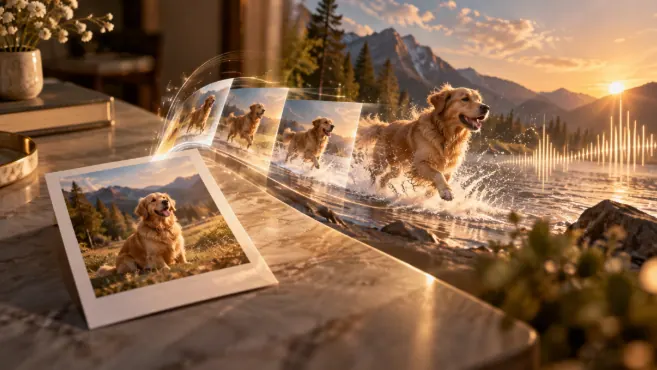
A single photograph can contain much more than a frozen moment.
A product image can become a short advertisement. A travel photograph can gain movement and atmosphere. A portrait can become part of a storytelling sequence. A still interior can transform into a cinematic walkthrough.
This is the idea behind Photo to Video AI.
Instead of starting from a video clip, the creative process begins with one static image. Artificial intelligence analyzes the visual information in that image and generates new frames that introduce motion over time.
But modern photo-to-video workflows are increasingly going beyond basic animation.
They can simulate camera movement, create environmental motion, animate subjects, introduce depth and, in some cases, combine the visual sequence with sound or audio that matches what is happening on screen.
The result is a new type of content workflow in which existing photographs can become reusable video assets rather than remaining limited to static formats.
For brands, creators and businesses with large image libraries, that can significantly expand what can be produced from material they already have.
Why turning photos into video matters
Brands already invest heavily in photography.
Product campaigns, portraits, ecommerce shoots, hospitality images, architecture, travel photography, food content and social media visuals often exist in large libraries.
Traditionally, when video was needed, a separate production had to be planned.
That often meant new locations, new lighting, new shooting days, additional editing and a new budget.
Photo-to-video generation introduces a different workflow.
A strong existing photograph can be transformed into motion content without recreating the entire shoot.
That does not mean filming becomes unnecessary. Traditional production still offers a level of control that generated video cannot always match.
But it does mean that photography can have a much longer creative life.
One campaign image may become a reel, a website loop, a paid ad, a product animation or a short cinematic sequence.
For businesses that need to publish frequently, that flexibility can be extremely valuable.
How Photo to Video AI works
At a high level, a photo-to-video model must solve two problems at the same time.
It needs to preserve what already exists in the image, while also generating convincing motion.
The subject should remain recognizable. The composition should not suddenly collapse. Objects should not change shape unnecessarily. But at the same time, enough visual change needs to happen for the result to feel like genuine video.
To do this, the system interprets visual information such as depth, perspective, lighting, object relationships and possible directions of movement.
It then generates new frames that attempt to remain coherent with the original image.
Recent research in image-to-video generation has focused strongly on this challenge, especially on improving temporal consistency and controlling motion while keeping the generated sequence faithful to the source image.
This is important because video is much less forgiving than a single image.
A small inconsistency in one frame may be invisible in a photograph, but repeated changes across a sequence can create flickering, distortion or unstable movement.
How movement brings a static image to life
One of the most effective ways to transform a photograph into video is through camera movement.
A static portrait can become more intimate with a slow push-in. A landscape can feel more expansive when the camera gradually pulls back. An interior can gain a stronger sense of space through subtle lateral movement.
Even very small changes in perspective can dramatically affect how the viewer experiences the image.
Subject movement adds another layer.
A person might turn slightly, breathe, smile or move their clothing. A product can rotate or shift position. A pet can react to something outside the frame.
The challenge is preserving visual identity while this happens.
Complex actions require the model to invent more information, so restrained movement often produces more believable results than dramatic gestures.
Environmental motion can be even more effective because it brings the scene to life without changing the main subject.
Curtains can move in the wind. Water can ripple. Steam can rise. Leaves can shift. Reflections can change. Clouds can move slowly across the sky.
A hotel terrace photograph, for example, might remain almost completely unchanged while sunlight moves across the scene, plants respond to a breeze and water in the pool begins to shimmer.
Nothing extraordinary happens, yet the photograph suddenly feels like a real moment.
Creating a stronger sense of depth
Static photographs already contain visual clues about distance and perspective.
AI can use those clues to create motion that makes the scene feel more three-dimensional.
Foreground objects may move differently from the background. The camera can appear to travel through the image. Layers can shift at different speeds.
This effect is especially useful in landscapes, interiors and architecture.
A photograph of a room, for example, can become more immersive when the camera appears to enter the space rather than simply zoom toward it.
For tourism or hospitality content, that difference can be significant.
A room is no longer just shown.
It begins to feel like a space the viewer could step into.
From motion to sound
Movement changes the image and sound changes the experience.
A silent video may already feel more dynamic than a still photograph, but the addition of audio can make the scene much more immersive.
A beach image becomes more believable when waves and wind are heard.
A café can gain subtle conversation, cups and ambient room tone.
A city scene can include traffic or distant voices.
A food video might use sizzling, pouring or cutting sounds.
Sound does not always need to be dramatic.
Ambient audio is often enough to give the scene a stronger sense of place.
Music can add emotion or rhythm, while sound effects can reinforce specific actions.
Voice can introduce narration or turn the sequence into a more complete storytelling asset.
The most convincing results usually come from audio that matches the movement on screen.
If a door closes, the sound should occur at the right moment. If waves reach the shore, the audio should support the visual rhythm.
Synchronization matters because mismatched sound immediately makes the sequence feel artificial.
Product photography can become advertising
Product images are one of the most useful applications of Photo to Video AI.
Brands often already have carefully produced packshots or campaign photography.
Instead of using those assets only in static formats, they can become short video content.
Imagine a perfume bottle photographed against stone.
The video could slowly move toward the product while light travels across the glass, a slight mist develops behind it and reflections change around the bottle.
Nothing about the product itself needs to change.
The movement simply makes the visual feel more premium.
This kind of transformation is useful for paid ads, launch content, ecommerce pages or short social videos.
The same idea works with cosmetics, electronics, fashion accessories or food packaging.
The key is not to over-animate the subject.
A product generally works best when it remains stable and recognizable while motion happens around it.
Fashion, beauty and portrait content
Portrait photography can also benefit from subtle motion.
A model's hair might move slightly. Fabric can react to wind. The camera can shift toward the subject. Light can move across the face.
For beauty content, these small changes may be enough to create a more polished and cinematic result.
The challenge is facial consistency.
If the system changes the shape of the eyes, mouth or hairstyle between frames, the video may quickly feel unnatural.
That is why controlled motion is particularly important with portraits.
A gentle head turn or expression change usually works better than a complex full-body action generated from a single photograph.
Travel and hospitality content
Travel and hospitality imagery is naturally suited to photo-to-video generation.
A static landscape can gain moving clouds, water, light or vegetation.
A hotel room can become a slow virtual walkthrough.
A restaurant terrace can feel more alive through subtle movement in plants, table settings and natural light.
A beach can gain waves and ambient sound.
For hospitality brands, this is particularly useful because extensive photography libraries already exist.
Existing images can be repurposed into reels, social ads or website videos without needing to replace every photograph with newly filmed footage.
This does not eliminate the need for real video production.
But it gives marketing teams another way to extend the value of the visual material they already have.
Food and beverage photography
Food is another category where small amounts of motion can produce a strong effect.
A cup of coffee becomes more inviting when steam rises naturally.
A cocktail can gain moving reflections, condensation or ice movement.
A dish can feel fresher when sauce is poured or light moves across the surface.
These effects work best when they remain believable.
Food can look artificial very quickly if movement becomes exaggerated.
The strongest results usually focus on one or two elements and let the rest of the composition remain stable.
Architecture and interiors
Architectural photography benefits from the ability to simulate camera movement.
A still interior can become a slow walkthrough.
A camera can approach a focal point, shift across a room or reveal more of the environment.
Light may change subtly across walls, while curtains or plants introduce gentle motion.
For architects, interior designers, hotels and real estate businesses, this creates a practical way to build video content from existing photography.
However, structural consistency is especially important.
Walls, furniture and architectural lines should remain stable.
If the system begins to distort the geometry of the room, the effect loses credibility very quickly.
Use movement to direct attention
Motion should not exist simply because video allows it.
It should guide the viewer.
If the camera moves toward a product, attention follows.
If one element moves while everything else remains still, that element becomes the visual focus.
If light gradually shifts toward one part of the image, the viewer's eye is naturally directed there.
In this sense, motion functions similarly to composition in photography.
It creates hierarchy.
That is particularly useful in commercial content, where the viewer should understand quickly what matters.
The objective is not simply to make the image move.
It is to make the movement support the message.
How to get better Photo to Video AI results
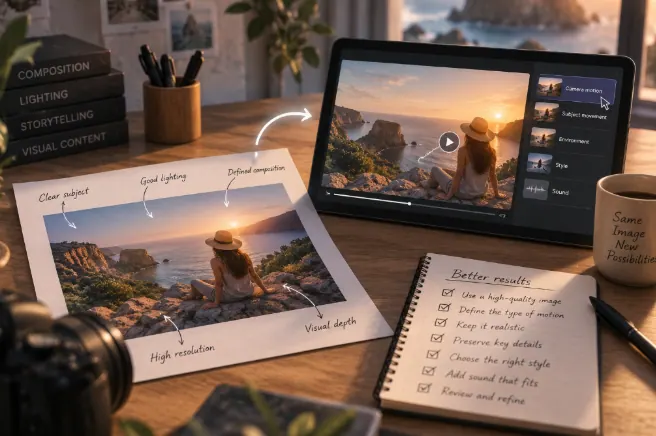
The quality of the original image has a major impact on the final video.
Photographs with a clearly defined subject, good lighting and a clean composition usually give the model a stronger starting point.
Images with complicated overlaps, unusual body positions or hidden objects may be harder to animate convincingly because the system needs to invent more information.
Creative direction also matters.
Uploading a photograph and asking the model to "make it move" gives very little guidance.
It is usually more effective to decide what kind of motion the scene actually needs.
Should the camera move?
Should the subject move?
Should only the background change?
Should the result feel calm, luxurious, energetic or dramatic?
For example, instead of simply asking to animate a product, a clearer direction might be:
“Create a slow camera push toward the product while reflections move across the glass and the background remains soft and stable.”
That instruction defines both the motion and what should remain unchanged.
Another useful principle is to keep the requested movement proportional to the original photograph.
The more the sequence moves away from what is visible in the source image, the more information the system has to invent.
A subtle camera movement requires relatively little reconstruction.
A 180-degree camera rotation requires the model to generate an entire environment that was never present in the photograph.
Short sequences and controlled movement are therefore often the strongest starting point.
Temporal consistency is still one of the main challenges
One of the biggest challenges in Photo to Video AI is keeping every frame visually consistent.
A face may shift.
A product label may distort.
Furniture might change slightly.
Patterns can disappear.
Background elements can move unexpectedly.
These problems are known as temporal inconsistencies.
They are one of the main reasons why generated video should always be reviewed carefully before professional use.
Current research continues to focus on making motion more controllable and preserving visual identity across frames.
For brands, this is particularly important.
A small visual error may be acceptable in experimental content, but it can become a serious problem if the generated video changes the design of a product or alters a recognizable face.
Photo to Video AI vs traditional video production
Photo-to-video generation and traditional filming are not direct replacements for each other.
They solve different problems.
Traditional production still offers greater control when a project requires authentic performance, precise physical interaction or long sequences.
Photo-to-video generation is especially useful when a brand already has strong photography, needs short clips, wants to test several creative directions or would find a complete reshoot inefficient.
It is also valuable when the desired visual is difficult or impossible to capture physically.
In many cases, the best workflow is hybrid.
Real footage provides authenticity, while generated clips extend the visual world of the campaign.
Photo to Video AI and AI Talking Photos
Talking-photo technology is a more specific application.
Its main goal is to make a portrait appear to speak, usually through lip synchronization, facial animation and voice.
Photo-to-video generation is much broader.
It can animate landscapes, products, interiors, food, animals, fashion and many other visual subjects.
A speaking portrait can therefore be part of a photo-to-video workflow, but it represents only one possible use.
One photograph can become multiple pieces of content
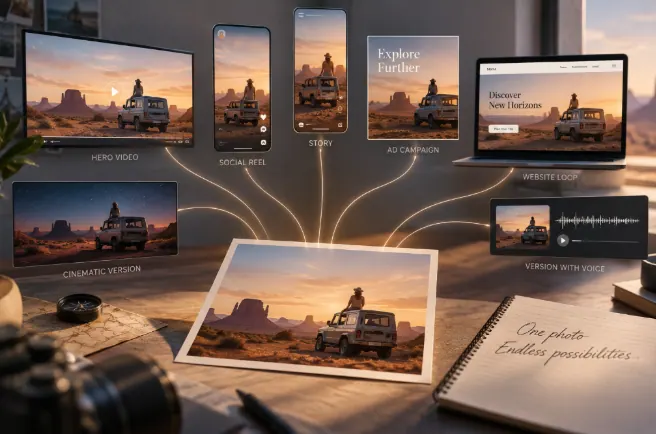
One of the strongest advantages of photo-to-video generation is scalability.
A single campaign photograph can potentially become a slow cinematic product clip, a vertical social reel, a short ad, a website hero animation or a version with voice and ambient sound.
The visual identity remains connected because every version originates from the same image.
This makes it possible to create more content without constantly changing the core creative direction.
For brands working across multiple channels, that consistency can be especially valuable.
Photo to Video AI as part of a wider content workflow
Photo-to-video generation becomes even more useful when it is combined with other creative tools.
A campaign might begin with product photography.
Those images can become moving sequences through Photo to Video AI.
Additional scenes can be created using Text to Video AI.
A presenter may be introduced using AI Video Avatars.
A portrait can speak through AI Talking Photos.
An additional atmosphere or cinematic treatment can be introduced through AI Video Effects.
Rather than treating each format as an isolated feature, brands can use them as parts of one flexible content workflow.
One original visual asset can therefore evolve into an entire set of connected content.
How Oopsify can help turn photos into dynamic video
A strong photograph already contains a visual identity.
It has composition, subject matter, color, lighting and brand direction.
Photo-to-video generation allows creators to build on that foundation instead of starting from zero.
With Oopsify, existing photographs can become the starting point for more dynamic visual content.
A product image can gain motion.
A travel image can become atmospheric.
A portrait can become part of a story.
An interior can become a cinematic sequence.
This makes existing visual material more adaptable to video-first platforms and gives brands more ways to reuse creative assets across campaigns.
From frozen moment to moving story
The most interesting thing about Photo to Video AI is not simply that it makes photographs move.
It changes what a photograph can become.
A product image can become an advertisement.
A landscape can become an immersive travel clip.
A portrait can become part of a narrative.
An interior can become a moving experience.
Sound can then add another layer, transforming the result from something we simply watch into something we begin to feel.
The technology continues to evolve, but the strongest results still depend on creative judgment.
Not everything needs to move.
The best videos identify what deserves motion, what should remain still and how movement can make the original image more effective.
When those choices are intentional, a single photograph can become much more than a static asset.
Frequently asked questions about Photo to Video AI
What is Photo to Video AI?
Photo to Video AI uses a static photograph as the visual reference for generating a moving video sequence. It can introduce camera motion, environmental animation, subject movement and other transformations.
Can Photo to Video AI add sound?
Yes. A photo-to-video workflow can include ambient audio, music, sound effects or voice. Sound may be generated automatically or added later during editing.
What photos work best for Photo to Video AI?
Images with a clear subject, good lighting, sufficient resolution and a simple visual structure usually provide the best starting point.
Can Photo to Video AI animate people?
Yes. However, small movements generally preserve facial and body consistency better than complicated actions generated from a single photograph.
Can it be used for product photos?
Yes. Product photography is one of the most useful applications because camera movement, lighting, reflections and atmospheric motion can make static packshots feel more dynamic.
Can a single photo create camera movement?
Yes. Generated video can simulate push-ins, pull-backs, pans and other perspective changes from a static source image.
Is Photo to Video AI useful for social media?
Yes. It can turn existing photography into reels, stories, ads and other short-form video formats without requiring a completely new shoot.
What is the difference between Photo to Video AI and AI Talking Photos?
AI Talking Photos are designed mainly to make portraits speak. Photo to Video AI is broader and can animate products, landscapes, interiors, people, food and many other subjects.
Does Photo to Video AI replace filming?
Not completely. Traditional filming remains more suitable when authentic performance, precise movement or longer sequences are required. Photo-to-video generation is better understood as an additional creative option.
← All posts